



3
devices found
3
devices found
3
devices found
-black.responsive-fx.png)
 Loading…

 Sales: 0330 678 1447
Need help placing an order?
Contact our sales teams:
0330 678
1447
Opening hours:
• Monday - Friday: 9AM - 7PM
• Saturday: 9AM - 5:30PM
• Sunday: Closed
Already placed order? Find help and support here:
Self-help
 Phone
Phone
Need
help placing an
order?
Contact our sales
teams:
0330
678 1447
Opening hours:
• Monday - Friday: 9AM - 7PM
• Saturday: 9AM - 5:30PM
• Sunday: Closed
Already
placed order?
Find help and support here:
Self-help
 Basket
New Contract
Loading…
Looking for a great SIM-free phone that ticks all the boxes when it comes to functionality and ease of use, but won’t hit your wallet too hard? All Nokia phones have consistently delivered in terms of great devices, building a reputation for being durable, reliable, and incredibly easy to use. Whether you’re looking for a simple mobile to keep in touch with loved ones or a spare handset you can trust to last, Nokia mobiles are a smart choice, and we have some great deals on the Nokia models in our range that you can take advantage of.
Choosing a SIM-free Nokia phone gives you the freedom to pick your own plan, switch carriers whenever you like (or whenever a better deal crops up), and means you’re not tied to a long contract. No matter what you’re looking for, we have some of the top Nokia SIM-free handsets in our range, but picking the best of them all comes down to both personal taste and what it is that you want from your mobile phone.
If you’re just looking for a handy phone to help you keep in touch with friends and loved ones, then the Nokia 110 is a great choice. It’s incredibly durable (well, it is a Nokia), has a rear camera for grabbing snaps on the move, and has an easy-to-use keypad. Plus, it has a great battery life too. Nokia phones are generally small, so they’re easy to slip into a pocket or bag without taking up too much space.
On the hunt for the best, cheap Nokia phone? You’re in luck. We have plenty of SIM-free Nokia mobiles.
The Nokia 110 is also one of the cheapest Nokia phones on the market, ensuring you get excellent phone quality at an affordable price. Meanwhile, the Nokia 105 comes in a little cheaper, making it potentially the cheapest mobile Nokia has produced. But what the 105 lacks in cost it more than makes up for in simple and easy to use quality, with a superb battery life that offers up to 12 hours of talk time in a single charge. It even features an FM radio, meaning you can enjoy your favourite station no matter where you’re listening from.
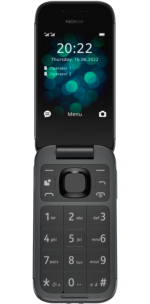
If you’re looking to embrace old-school flip phones with the technology you’d expect from a modern device, a Nokia SIM-free flip phone is a great option. It offers plenty of flexibility, cost savings, and a distraction-free experience – no unnecessary apps to slow you down, all while keeping the robust build and long battery life that Nokia is known for. The Nokia 2660 flip phone is a great SIM-free option and is a stand-out model that is designed for ease of use with its large buttons, bright displays, and handy 4G connectivity. It’s a great, simple, and reliable phone.
Yes, our SIM-free Nokia phones are unlocked, which means they can be used with any UK network.
Yes, as long as your SIM card fits and your network is compatible, you can use it in your SIM-free Nokia phone without any issues.
Nokia phones receive regular Android OS updates and security patches, as confirmed by HMD Global, the parent company of Nokia.
Nokia smartphones generally tend to use the Android operating system.
Nokia phones have a long history of being known for their durability, which makes them a great choice for users of all ages, along with those who are looking for a reliable spare phone suited to use in industry or sports.
In most cases, buying a budget or mid-range SIM-free Nokia handset is more affordable over the long term compared to spreading the cost of premium handsets on a contract.
Yes, as long as your phone is SIM-free and unlocked, you can insert a local SIM card while travelling. Just make sure the model supports the correct network of your destination. To avoid high roaming costs, consider inserting a local prepaid SIM.
Yes, many Nokia handsets support 4G connectivity. For example, the Nokia 105 4G, the Nokia 110 4G, and the Nokia 2660 Flip all offer faster browsing, calls, and texts wherever 4G is available.
Need to check if your Nokia phone is still under warranty? The simplest way is to visit the warranty finder on the HMD website (HMD is the name of Nokia’s parent company). To use this, you’ll need to enter your phone IMEI code, which you can find in two ways depending on the type of handset you own: Nokia smartphones: Go to Settings > About Phone > Status > IMEI information Classic Nokia phones: Enter *#06# on your keypad from the main screen
If you need user support for your Nokia phone, there are a couple of ways to get what you need. If you have a Nokia smartphone, you can access a mobile support chat from the My Phone app on your handset. Or, you can
According to HMD, the parent company of Nokia, Nokia phones will receive regular OS updates and regular security patches.


Carphone Warehouse is a trading name of Currys Retail Limited. Registered Office: Currys Newark Campus, Long Hollow Way, Newark, NG24 2NH. Registered in England No. 2142673. © 1995-2024 Currys PLC
©Currys Mobile Insurance policies are underwritten by Chubb European Group SE (UK Branch) and arranged and administered by Currys Retail Limited. Chubb European Group SE is a Societas Europaea, a public company registered in accordance with the corporate law of the European Union. Members’ liability is limited. Chubb European Group is headquartered in France and governed by the provisions of the French insurance code. Risks falling within the European Economic Area are underwritten by Chubb European Group, which is authorised and regulated by the French Prudential Supervision and Resolution Authority. Registered company number: 450 327 374 RCS Nanterre. Registered office: La Tour Carpe Diem, 31 Place des Corolles, Esplanade Nord, 92400 Courbevoie, France. Fully paid share capital of €896,176,662.
Chubb European Group SE (UK Branch) is registered in England & Wales under UK Establishment number: BR023093. UK Establishment address: 40 Leadenhall Street, London EC3A 2BJ. Authorised by the Prudential Regulation Authority. Subject to regulation by the Financial Conduct Authority and limited regulation by the Prudential Regulation Authority. Details about the extent of our regulation by the Prudential Regulation Authority are available from us on request. Details about our authorisation can be found on the Financial Conduct Authority’s website (FS Register number 820988). Chubb European Group SE (UK Branch) is regulated in relation to the product and post-sale activities, including complaints, claims and administration.